Author name: Rolle IT Cybersecurity

What Is a Compliance Assessment (and Why XDR and Vulnerability Scans Aren’t Enough)?

What Is a Compliance Assessment?

A compliance assessment is a structured evaluation of whether your systems, configurations, and security controls meet defined regulatory or framework requirements such as CMMC or NIST.

Unlike traditional security tools, it does not just identify risks—it verifies whether controls are correctly implemented and functioning as intended.

A compliance assessment validates whether controls are correctly implemented—not just whether tools are present.


Why This Matters More Than Ever

Many organizations believe they are compliant because they have invested in modern security tools like XDR and vulnerability scanners.

But compliance is not about tool deployment.
It is about control effectiveness, configuration accuracy, and documented evidence.

This is where the gap exists—and where most audit failures occur.


What XDR Does (and Doesn’t Do)

Extended Detection and Response (XDR) platforms are critical for modern security operations.

What XDR Does Well:

  • Detects suspicious activity and threats
  • Provides endpoint and identity visibility
  • Enables rapid response to incidents

What XDR Does NOT Do:

  • Validate system configurations against compliance frameworks
  • Confirm that required controls are implemented correctly
  • Provide structured, audit-ready compliance evidence

XDR is designed for detection and response, not compliance validation.


What Vulnerability Scanning Does (and Doesn’t Do)

Vulnerability scanning tools identify known weaknesses across systems and applications.

What Vulnerability Scans Do Well:

  • Identify missing patches and known CVEs
  • Highlight exposed services and outdated software
  • Provide risk-based prioritization of vulnerabilities

What Vulnerability Scans Do NOT Do:

  • Assess whether security policies are correctly configured
  • Validate control implementation across environments
  • Correlate findings with real-world compliance requirements

Vulnerability scans measure exposure, not compliance readiness.


Compliance Assessment vs. Security Tools

CapabilityXDRVulnerability ScanCompliance Assessment
Detect threatsYesNoPartial
Identify vulnerabilitiesNoYesYes
Validate configurationsNoNoYes
Confirm compliance alignmentNoNoYes
Provide audit-ready documentationNoNoYes

This distinction is critical.

Security tools generate signals.
Compliance assessments validate the environment behind those signals.


What a True Compliance Assessment Includes

A real compliance assessment goes beyond scanning and detection. It provides a comprehensive, evidence-based view of your environment.

Key Components:

1. Configuration Validation
Evaluates system settings, policies, and configurations against compliance requirements.

2. Control Implementation Review
Confirms whether required controls are properly deployed and enforced.

3. Cross-System Correlation
Analyzes data from multiple sources—XDR, vulnerability scans, telemetry—to identify gaps.

4. Evidence and Documentation
Produces structured output that supports audits and internal reporting.

5. Actionable Remediation Guidance
Identifies not just what is wrong, but what to fix and how to prioritize it.


Where Organizations Typically Fail

Even well-resourced IT teams encounter the same challenges:

  • Over-reliance on tools instead of validation
  • Misconfigured policies and security settings
  • Configuration drift across environments
  • Lack of centralized visibility across systems
  • Insufficient documentation for audits

The result is a false sense of security—and increased risk of compliance failure.


Introducing ARCH by Rolle IT

ARCH is Rolle IT’s AI-supported compliance assessment platform designed to close the gap between security tools and compliance validation.

It combines:

  • XDR data
  • Vulnerability scan results
  • Security telemetry
  • System and environment configurations

Into a single, real-time assessment model.

What ARCH Delivers:

  • A snapshot of your current environment
  • Identification of hidden gaps and misconfigurations
  • Validation of control implementation
  • Detailed, audit-ready reporting
  • Actionable insights for remediation

ARCH is purpose-built for organizations operating in Microsoft GCC High environments and those pursuing CMMC compliance.


From Assumption to Evidence

If your organization relies solely on XDR and vulnerability scanning, you are only seeing part of the picture.

A compliance assessment provides the missing layer:
validation, alignment, and proof.

ARCH gives you the ability to move from:

  • Tool deployment → Control validation
  • Security signals → Compliance evidence
  • Assumptions → Confidence

Take the Next Step

Before your next audit—or before risk becomes reality—understand where you truly stand.

Learn how ARCH can help your organization validate compliance, identify gaps, and build a defensible security posture.

Contact [email protected] for more information

What Is a Compliance Assessment (and Why XDR and Vulnerability Scans Aren’t Enough)? Read More »
The Misunderstanding Around GCC High

Many organizations assume:

“If we are in GCC High, we are closer to compliance.”

While partially true, this assumption is dangerous.

GCC High provides:

  • A compliant infrastructure baseline

But it does not guarantee:

  • Proper configuration
  • Control implementation
  • Policy enforcement

Compliance still depends on how your environment is configured and managed.


Key Challenges in GCC High Compliance Validation

1. Identity and Access Complexity

Identity is central to CMMC and security frameworks.

In GCC High environments, organizations often struggle with:

  • Conditional access misconfigurations
  • Over-permissioned accounts
  • Inconsistent MFA enforcement
  • Role-based access issues

These gaps are difficult to detect without detailed configuration analysis.


2. Policy and Configuration Misalignment

Security policies must be:

  • Defined
  • Applied
  • Verified

Common issues include:

  • Policies created but not enforced
  • Conflicting configurations across systems
  • Incomplete deployment of required settings

Without validation, these issues remain hidden.


3. Logging and Telemetry Gaps

CMMC requires:

  • Logging
  • Monitoring
  • Traceability

In GCC High, organizations often encounter:

  • Incomplete log coverage
  • Misconfigured retention policies
  • Gaps between systems generating logs and systems storing them

This creates risk in both security operations and compliance validation.


4. Configuration Drift in Cloud Environments

Cloud environments are dynamic by nature.

Over time:

  • Settings change
  • Permissions evolve
  • Policies are modified

This leads to configuration drift, where the environment no longer matches its intended compliant state.

Without regular validation, drift introduces silent compliance gaps.


5. Lack of Unified Visibility

GCC High environments span multiple layers:

  • Microsoft 365 services
  • Identity systems
  • Endpoint configurations
  • Security tools

Most organizations lack a unified way to see:

  • How these systems interact
  • Whether controls are consistently implemented
  • Where gaps exist across the environment

This fragmentation makes validation difficult.


The Core Challenge: Seeing the Whole Environment

Compliance in GCC High is not about individual tools or settings.

It is about:

  • How systems are configured
  • How controls are enforced
  • How data flows across the environment

Without a unified, correlated view, organizations are left with:

  • Partial insights
  • Incomplete validation
  • Increased audit risk

What Effective GCC High Validation Requires

To confidently validate compliance in GCC High, organizations need:

Configuration-Level Visibility

Understanding how systems are actually configured—not just how they should be configured.

Cross-System Correlation

Connecting identity, endpoint, telemetry, and policy data into a cohesive assessment.

Control Mapping

Aligning configurations and findings to frameworks like CMMC.

Evidence Generation

Producing documentation that supports audit requirements.


How Rolle IT ARCH Tool Solves GCC High Validation Challenges

ARCH by Rolle IT was built with GCC High environments in mind.

It provides a structured, real-time assessment that combines:

  • XDR insights
  • Vulnerability data
  • Telemetry
  • System configurations

ARCH Enables Organizations To:

  • Capture a true snapshot of their environment
  • Identify misconfigurations across systems
  • Validate control implementation against compliance standards
  • Detect gaps caused by drift or misalignment
  • Generate actionable, audit-ready reports

ARCH delivers the visibility that GCC High environments require—but most organizations lack.


From Complexity to Clarity

GCC High environments are powerful, but they are not self-validating.

Compliance requires:

  • Insight
  • Validation
  • Documentation

Without these, complexity becomes risk.


Operating in GCC High does not guarantee compliance.

It raises the standard for how compliance must be validated.

If your organization needs a clearer, more defensible view of its environment:

ARCH provides the assessment capability to get there.

Connect with us at [email protected]

The Misunderstanding Around GCC High Read More »

Top 10 Failed CMMC Controls, #10 System Baselining

CMMC Journey Guides

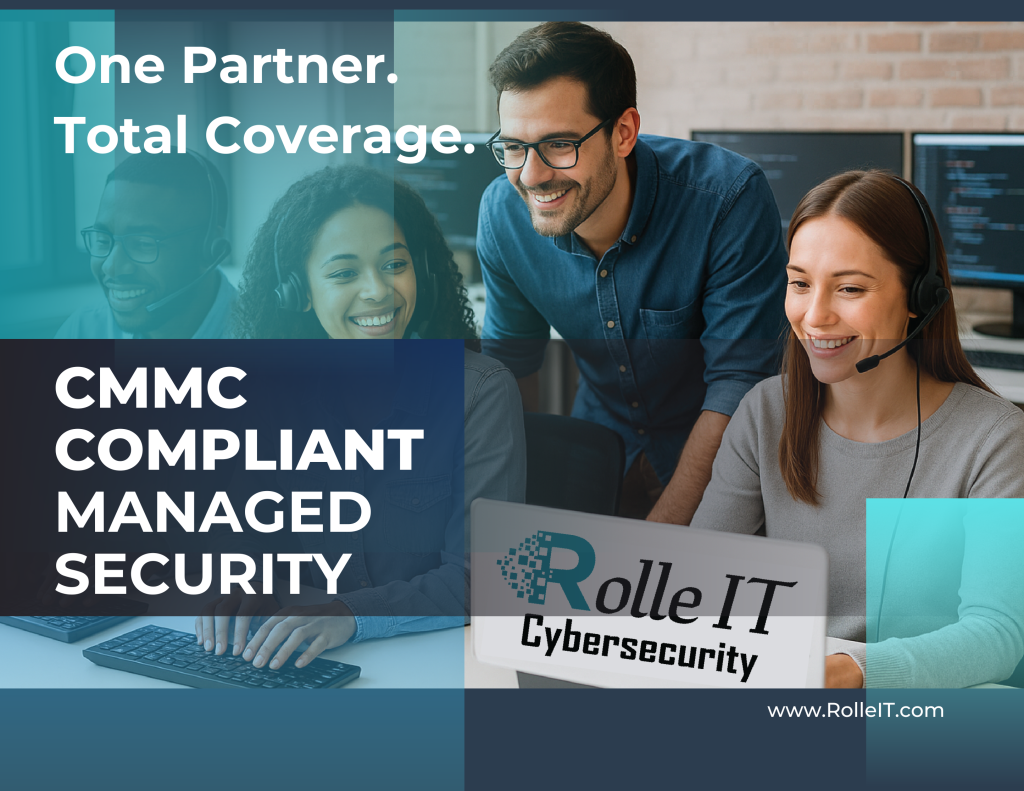
#10- CM.L2-3.4.1: System Baselining

When working with individual controls, we know that they have to be dissected from an objective level. For this specific control out of the 110 controls, 320 objectives in CMMC, I have chosen to split it up with objectives a/b/c and d/e/f. Two parts, mainly covering “baseline configurations” and “system inventory”. If you work with CUI, you don’t get to “wing it” on configurations or inventory. CM.L2-3.4.1 asks you to do two big things across the system life cycle:
(1) build and maintain secure, documented baselines for each system and
(2) keep a trustworthy inventory that actually reflects reality in production.

The CMMC Level 2 Assessment Guide spells this out clearly, including exactly what assessors will “Examine/Interview/Test” to verify it’s in place. In this article we will get granular with 1) Dissecting the Control, 2) What full implementation looks like, 3) Why this Control Fails, 4) A Quick Checklist.

1) Dissecting The Control in Two Logical Halves

Objectives A/B/C: Baseline Configurations

  • [a] Establish a baseline configuration for each system component type. For every deployed machine type, you define the approved build: OS version, required apps, hardened settings, network placement, and anything else that affects security and function.
  • [b] Include the full buildout for each system. Baselines must cover hardware, software, firmware, and documentation—not just a golden image. Think platform model/BIOS, OS and app versions/patch status, and the config parameters that lock it down.
  • [c] Maintain it consistently moving forward. As your environment changes, review and update baselines so they always reflect the live system and enterprise architecture (create new baselines when things change materially).

What lives in a solid baseline:

  • Laptops/Desktops/Servers
  • Enclaves (e.g., entire VDI and each component), laptops/workstations, servers
  • ALL Applications per asset group
  • Versions & patch levels for OS/apps/firmware
  • Networking elements: routers, switches, firewalls, WAPs, etc.

Objectives D/E/F: System Inventory

  • [d] Establish a system inventory. A real one… no, seriously. This is ideally software via Asset Management agent(s) that automate most of this process. BUT that is not required, just advice. Any devices classified as any of the CMMC asset types will be in-scope and should be in the system inventory.
  • [e] Include the full buildout for each system in the inventory. (again: hardware, software, firmware, and documentation).
  • [f] Maintain it. Review and update it as systems evolve so it stays accurate to production reality in a reasonable and timely manner.

What lives in a solid inventory:

  • Manufacturer, device type, model, serial number, physical location, owners/main users
  • Hardware specs & parameters
  • Software inventory with version control and potentially licensing information
  • Network info (machine names, IPs)

Assessor angle (what they look at): Policies, procedures, SSP, Configuration Management plan, inventory records and update logs, config docs, change/install/remove records; plus, interviews with the people who build and maintain these things; plus, tests of the actual processes and mechanisms you use to manage baselines and the inventory.

2) What Full Implementation Looks Like

A simple, effective pattern from the Assessment Guide:

  1. Design a secure workstation baseline. Research the hardened settings that deliver the least functionality needed to do the job, then test that baseline on a pilot machine.
  2. Document it (build sheet, settings, required software, version list, how it’s joined to the network) and roll it out to the rest of that asset class from the documented baseline.
  3. Update the master inventory manually, or make sure an appropriate agent is live to reflect the software changes and the devices now at the new baseline.
  4. Schedule a regular review interval to re-validate versions, patches, and settings; or make review a normal part of your SOP that is updated on a regular basis.

Scale that approach across all deployed machine types:

  • Enclaves & Virtual Desktop Infrastructure: baseline the image and each supporting component (connection brokers, secure gateways, user-profile layers, and file-system layers).
  • Laptops & Workstations: document hardware models and BIOS/UEFI versions, OS build, required apps, GPOs/MDM profiles.
  • Servers: OS baselines per role (AD/DNS, file, app, DB), service hardening, approved modules/agents.
  • Networking: switch/router/Firewall/WAP firmware baselines, approved feature sets and templates.
  • Applications Inventory: version standards, required configs, and how they’re deployed/updated.
  • Docs: build guides, change records.

And yes, tie everything to change management controls, because the second you patch, you either (1) update the baseline or (2) record an approved deviation and a plan to reconcile. The guide’s “Potential Assessment Considerations” call out version/patch levels, configuration parameters, network info, and communications with connected systems (proof for [a]/[b]), and timely baseline updates ([c]).

How computers are actually baselined, end-to-end:

  1. Procurement & intake: approve models; capture serials/asset tags at receipt; record ownership/location.
  2. Imaging: apply the gold image (or Autopilot/MDT/SCCM/Intune flow); inject drivers; enforce policies (GPO/MDM).
  3. Hardening: apply CIS/NIST-inspired settings that match your baseline; lock services/ports/protocols; set logging.
  4. Application set: install required software; check licensing; verify versions.
  5. Join & place: join to domain/MDM; put it in the right OU/MDM group/VLAN/segmented subnet.
  6. Recordkeeping: update the inventory with HW/SW/firmware/docs and network details; save the build sheet and sign-off.
  7. Review cadence: calendar-based (e.g., quarterly) and/or event-based (whenever a major patch lands) to keep baseline and inventory current ([c], [f]).

3) Why This Control Fails (Top-10, sitting at #10)

Short answer: it’s a lot of work. and it’s the kind that doesn’t scream until something goes terribly wrong…

  • Documentation feels heavy. A real baseline covers hardware, software, firmware, and documentation and needs regular updates. That is inherently more than “we have an image.” It is buildout documentation, version matrices, network placement, and the approval trail that shows the baseline evolved with your environment.
  • Inventory discipline gets neglected. Many shops run with a “good enough” list. CMMC expects manufacturer, model, serial, location, owner, license/version data, and network identifiers; and expects you to keep it aligned to reality. If the list doesn’t match what’s plugged in, you’ll feel it during interviews and evidence review… and potentially a failed assessment.
  • Change is constant. Patches, feature updates, firmware drops, and hardware refreshes mean your baseline and inventory are living artifacts. If you don’t have a trigger to update both when changes roll out, drift creeps in, and you’ll miss [c]/[f] maintenance requirements.
  • Historical culture. Plenty of orgs “got by” without rigorous Change Management and Asset Inventory. CMMC is forcing the shift from tribal knowledge to documented, reviewable practice. Assessors will Examine/Interview/Test to verify it’s not just policy on paper.
  • Tool sprawl and ownership ambiguity. If imaging is owned by one team, firmware by another, and inventory by a third, gaps appear. You need clear roles and a single source of truth that each team updates as part of their workflow (again, the guide’s methods target exactly these mechanisms).

4) A Quick checklist you can actually use:

  • A baseline configuration exists for each asset class (VDI, laptop/WS, server roles, network devices, key apps) with:
    • Versions/patch levels, hardened settings, required software, network placement, and rationale (A/B).
    • An update log proving periodic and event-driven reviews (C).
  • A system (asset) inventory exists and matches production, with HW/SW/firmware/docs and the who/where/how (D/E).
  • A cadence (calendar + change triggers) keeps both baseline and inventory in sync with reality (F).
  • Evidence on hand for assessors: policies, CM plan/SSP, build sheets, images/scripts, install/removal/change records, inventory review logs, asset inventory dashboards, and interviews with the people who actually do the work (the assessment guide lists these explicitly).


Sources:

  • CMMC Assessment Guide – Level 2, CM.L2-3.4.1 (practice statement, objectives a–f, methods, discussion, example).
  • NIST SP 800-171A, 3.4.1 (assessment objectives and methods).
  • NIST SP 800-171r2, 3.4.1 discussion (what belongs in baselines and inventories).

Top 10 Failed CMMC Controls, #10 System Baselining Read More »